
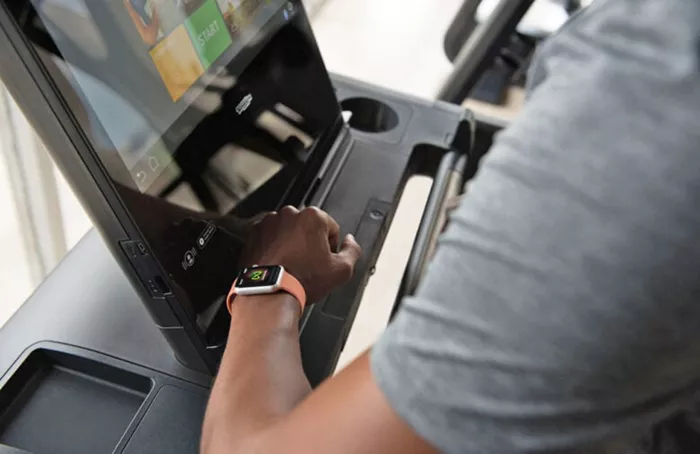
Connecting your Apple Watch with cardio equipment in the gym can dramatically enhance workout tracking, and Planet Fitness is increasingly supporting this functionality. Here’s how to pair your watch with a Planet Fitness treadmill (or other machines), what to watch out for, and how this fits into the bigger picture of Planet Fitness’ growth and member experience.
How to Pair Your Apple Watch with Planet Fitness Equipment
1. Enable “Detect Gym Equipment”
On your Apple Watch, go to Settings → Workout and turn on Detect Gym Equipment. If this toggle is off, your watch won’t even try pairing. This is the foundational step required to connect with gym machines.
2. Tap Your Watch to the Machine’s Reader
Most gym treadmills, ellipticals, and bikes that support Apple Watch will display a label or icon reading “Connects to Apple Watch” near a contactless reader. Hold your watch close (within a few centimetres) to that reader, making sure the display is facing the surface. If the hardware and software cooperate, the watch will tap and beep to confirm connection.
3. Start the Workout on the Machine
Once paired, pressing “Start” on the gym equipment should automatically trigger the corresponding workout session on your Apple Watch. At the end, when you press “Stop,” the session ends. The data syncs to the Activity app on the watch and the Fitness (or Health) app on your iPhone.
4. Sync with Planet Fitness’ App (Optional)
If you use the Planet Fitness Workout app as a member, you can let it integrate with Apple Health. That way, the data recorded via the app or via gym equipment can both feed into the Health framework. After each workout, your metrics can appear in one unified place.
This approach essentially gives you two parallel paths: direct pairing between the watch and gym hardware, and a supplementary path via the Planet Fitness app syncing into Health.
What Can Go Wrong — and How to Fix It
Software Updates Can Break Compatibility
Some users have reported that watchOS 10.5 introduced bugs that impair pairing with Matrix gym equipment (commonly found in Planet Fitness locations). Beeps may occur, but the actual connection fails. In some cases, downgrade or wait for a patch is the only remedy.
Not Every Machine Supports the Pairing
Even if a gym advertises Apple Watch compatibility, individual machines might not support it (or may have faulty NFC/contactless readers). Users on forums mention trying multiple machines until one works.
Toggle Off / Restart Might Help
If pairing fails, toggle the “Detect Gym Equipment” setting off then on again, restart your watch, or try reapproaching the contactless reader. Sometimes the connection process needs a clean start.
Competing Apps May Conflict
If you’re running simultaneous tracking apps (Planet Fitness app, third-party fitness apps, the Apple Workout app), they may aggregate data slightly differently. While most differences are small, it’s best to choose one source to trust for consistency.
Why This Matters: Accuracy, Convenience & Motivation
Pairing directly with gym machines lets you harness machine data (like incline, speed, resistance) in harmony with your watch’s sensors. This reduces discrepancies and yields more accurate calorie counts, heart rate records, and workout summaries. Over time, that clarity helps you monitor progress, set goals, and stay motivated.
For Planet Fitness members, this gives added value to both your membership and your tech ecosystem. Rather than juggling separate apps and guesswork, the experience becomes more seamless: walk into the gym, tap your watch, and your workout is automatically captured.
